insight
HR management software (HRMS) for small businesses
Last updated: April 14, 2026
Small business HRMS can help employers achieve greater efficiency and accuracy across their HR operations and minimize costly risks. This guide explains why small businesses may need an HRMS, features to look for, how to evaluate providers and best practices for implementation.
HRMS for small business key takeaways:
- HRMS automates core HR functions, like payroll and benefits administration, and helps employers manage their workforce and compliance obligations.
- Regulatory compliance, workplace safety, scalability issues and talent retention are common challenges for small businesses that don’t have an HRMS.
- Features common with HRMS include payroll, benefits administration, compliance management, HR and performance management.
- Small businesses can procure an HRMS by defining success metrics, evaluating how well a potential solution meets requirements and prioritizing implementation and support services.
Table of Contents
- What is HRMS for small businesses?
- Why do small businesses need HR software?
- Challenges small businesses face without an HR platform
- What features should small business HRMS include?
- Benefits and advantages of HRMS software for small businesses
- How to choose the best HR platform for a small business
- Implementation best practices for small teams
What is HRMS for small businesses?
HRMS is technology that helps small businesses more efficiently manage HR and improve their compliance efforts while reducing operational costs. Modern solutions are cloud-based and may leverage rules-based configurations and artificial intelligence (AI). With these advancements, HRMS can assist employers in the following ways:
- Automating HR functions, such as payroll and talent acquisition
- Monitoring paid time off (PTO), overtime and employee leave
- Optimizing employee recruiting and onboarding
- Streamlining employee benefits administration and open enrollment
- Supporting compliance with federal and state regulations
Why do small businesses need HR software?
Small businesses require the same level of HR sophistication as larger companies, but unfortunately, most lack the resources to build it themselves. The solution isn’t necessarily hiring more people or learning more regulations – it’s finding ways to access enterprise-level capabilities without enterprise-level overhead.
One potential option is HRMS, which automates time-consuming tasks so small business employers have more time to think strategically. In many cases, the technology is also supported by a team that excels in monitoring changing laws, integrating payroll and benefits, providing friction-free onboarding and everything else needed to grow without the guesswork.
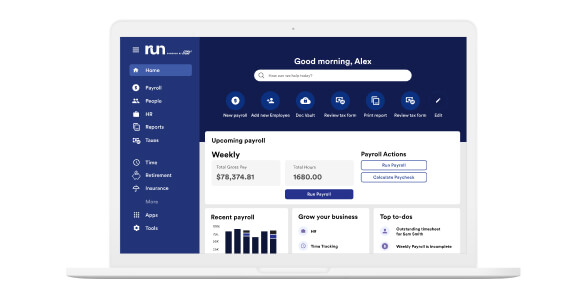
Get payroll, HR and so much more with ADP
ADP's comprehensive payroll solutions help you ensure accuracy, compliance, and efficiency – no matter your business size.
Challenges small businesses face without an HR platform
It can be rewarding to watch a business grow. But without an HRMS, growth also presents stressful challenges that can leave small business owners lying awake in the middle of the night. Some of the more troubling obstacles pertain to compliance, risk and safety, scalability, and talent.
The compliance minefield
Compliance might start as a manageable task for a small team, but it can quickly become a complex web of federal, state and local regulations. Consider that each new state a business expands into might have its own payroll taxes, labor laws and workplace rules. What works perfectly in the home state of operations may not work in other states. Simply put, it can be challenging to stay on top of compliance without the expertise of an HRMS provider.
The reality of risk and safety
The U.S. Department of Labor enforces over 180 laws1 designed to protect employees, and violations often prove costly. An unsafe work environment, for instance, can result in fines up to $16,550, according to the Occupational Safety and Health Administration (OSHA).2 That’s a budget-busting hit capable of derailing a business’s growth plans overnight. Employers can help mitigate such unnecessary penalties with the compliance support of an HRMS.
The scaling paradox
Every new hire, location or system adds operational complexity that can quickly overwhelm a small business’s existing processes. What worked for 10 employees becomes unmanageable at 50 and completely breaks down at 100.
Challenges of scale, as just described, usually stem from HR, payroll and compliance functions that are patched together using different systems and manual processes. Therefore, it’s essential to create a solid foundation as early as possible with smart, streamlined and integrated HRMS technology.
The talent tightrope
Poor first impressions with new hires are hard to recover from. Yet, many small businesses lack the resources to create a polished onboarding experience that makes new team members feel confident and connected from day one.
Benefits are equally important to employee retention, and in today’s competitive job market, generic benefits packages may not cut it. Small businesses can maximize their appeal by using an HRMS to help create total compensation packages with personalized benefits.
What features should small business HRMS include?
Small business HRMS should be capable of supporting daily administrative tasks, as well as larger strategic goals. Core features of systems that fit the bill include:
- Payroll and tax administration
- Human resources
- Compliance
- Talent management
- Benefits administration
Payroll and tax administration
An HRMS with integrated payroll and time and attendance can process payroll quickly and accurately. The provider may also lend support with tax compliance and employee payroll inquiries, helping save time and resources.
Human resources
Most HRMS providers offer tools and resources to help manage common HR responsibilities, like workplace safety and the development of employee policies and handbooks.
Compliance
HRMS providers may offer compliance experts as part of their service. They can help employers keep pace with ever-changing HR regulations governing taxes, health care, workplace safety, unemployment insurance, new hire reporting and more.
Talent management
The talent suite within an HRMS is designed to help small businesses successfully attract, engage and retain employees. As such, it commonly has functions supporting recruitment, onboarding, training and development, and performance management.
Benefits administration
An HRMS can help simplify benefits administration, including open enrollment, invoice reconciliation, reporting and responding to benefits inquiries from employees.
Benefits and advantages of HRMS software for small businesses
Leading HRMS technology, backed by expert support, can help small businesses better manage employment responsibilities and adapt to whatever comes their way. Specific benefits include:
- Efficiency
An HRMS automatically completes labor-intensive tasks with minimal involvement from HR practitioners, saving time and resources. - Accuracy
Electronic time tracking and payroll processing eliminate manual data entry and reduce the chance of mistakes. - Flexibility
HRMS payroll may be able to accommodate direct deposit, printed checks and alternative payment methods, like pay cards, so employers can meet various employee preferences. - Empowered employees
Self-service tools, common with HRMS, allow employees to view their compensation data, manage their benefit selections and request PTO. - Scalability
HRMS capabilities extend beyond payroll, helping small businesses meet new HR requirements and employee management needs as they grow. - Integrated data
A fully integrated HRMS is a centralized platform where employers can access the HR data they need quickly without having to log into multiple systems. - Cost savings
With greater confidence in their payroll tax obligations, employers can help avoid unexpected expenses or penalties due to inaccurate or late tax filings. - Employee retention
When employers are able to focus greater attention on strategic rather than transactional HR, they’re more capable of cultivating a positive workplace culture that retains people.
How to choose the best HR platform for a small business
HR impacts every employee in a small business, which is why it’s imperative to find an HRMS that effectively connects people and processes. Locating such a solution usually requires the following steps:
- Define success
Establish the criteria, including benchmark data and desired outcomes, for determining whether an HRMS will align with business goals. - Conduct thorough research
Use customer reviews, case studies and industry reports to gather information on different HRMS vendors, their products and their reputations in the market. - Evaluate product fit
Explore how well various HRMS functions and features meet organizational needs, including security standards and compliance requirements. - Consider vendor fit
Evaluate the vendor’s track record with other small businesses in similar industries. - Assess implementation and support services
Ensure the HRMS provider has a structured implementation plan and can provide adequate support during and after the process.
Questions to ask potential HRMS providers
- What due diligence do you take to learn a client’s unique HR needs?
- Do we have a dedicated team to contact for HR-related questions?
- What strategic HR guidance and tools do you provide?
- Do you have specialized talent professionals to help elevate our talent strategy?
- Do you provide proactive and centralized compliance support?
- Do you offer regular business reviews with recommendations to improve our operations?
- Do you provide risk and safety support to identify, mitigate and minimize HR risks?
- What training courses do you offer to develop and upskill our employees?
Implementation best practices for small teams
Properly preparing for HRMS implementation can help ensure that the process goes smoothly. Generally, there are five steps:
- Document processes
Define the full scope of existing HR and payroll processes to help ensure that the new HRMS provider covers all necessary functions. - Gather data
Find out where all the legacy payroll and HR data is stored, verify its accuracy and map its transfer to the new HRMS. - Inform third parties
Benefits providers, government agencies, unions and financial institutions, for example, may need to be notified about a change in HRMS technology. - Secure stakeholder buy-in
HRMS implementation is usually easier when there is broad support from both employees and senior leadership. - Prepare the infrastructure
Verify if any new software, hardware or integrations will be required to implement the HRMS.
Frequently asked questions about small business HRMS
What’s the difference between HRIS and HRMS?
An HRIS is a centralized technology solution that stores the employee information needed to complete core HR functions, such as payroll processing, benefits administration and employee time tracking. An HRMS performs these same operations but adds reporting and performance management tools. As such, employers using an HRMS can gather data to better understand their workforce and improve productivity.
How much does HR software for small businesses cost?
HRMS fees vary, however, providers typically charge based on the number of people employed by a business, how often it runs payroll and the total services needed. When weighing costs, it’s important to consider the time it takes to administer payroll and benefits without software. The time saved using HRMS usually makes it a cost-effective purchase.
How long does it take to implement an HR platform for a small business?
The speed with which an HRMS is implemented depends on individual business priorities, the scope of the solution and how quickly employers can provide the required data. Some small businesses can be operational in 10 days or less, while larger organizations may need a longer implementation period.
Is employee management software the same as HR management software?
Employee management software is a subset of HR management software focused specifically on time and attendance and workforce productivity. HRMS offers broader functionality, including payroll, benefits and performance management.
Can HRMS software support remote or distributed teams?
An HRMS can generally support remote employees if it keeps pace with payroll tax regulations in all the states where people are working. Employers may also need to register their businesses in those states and implement policies that require employees to immediately disclose any changes in their work locations.
2Occupational Safety and Health Administration, OSHA Penalties, 2025

Want more exclusive business insights like this delivered to your inbox?Subscribe now
This article is intended to be used as a starting point in analyzing HRMS for small businesses and is not a comprehensive resource of requirements. It offers practical information concerning the subject matter and is provided with the understanding that ADP is not rendering legal or tax advice or other professional services.