Last updated: November 20, 2026
Shift planning is how employers overcome scheduling challenges, such as skill gaps, fluctuating consumer demand and unplanned absences. This guide explores shift planning best practices, including the use of scheduling technology to help maintain productivity even when unforeseen circumstances arise.
Shift planning key takeaways:
- Shift planning aligns staffing levels with expected workloads or customer activity to help improve productivity and control costs.
- Common scheduling challenges include forecasting demand, managing employee availability, addressing absences, maintaining compliance and controlling labor costs.
- Businesses may use fixed, rotating, split, flexible or compressed schedules depending on operational needs and workforce requirements.
- Scheduling software can automate forecasting, improve labor-cost visibility, streamline shift swaps, ensure shift coverage, support compliance efforts and reduce the time required to create schedules.
- Effective shift planning practices include scheduling employees with the right skills and certifications, optimizing schedules based on availability and demand, posting schedules in advance, and preparing for unexpected absences.
Employers today face any number of scheduling challenges – talent shortages, supply chain disruptions, fluctuating consumer demand and employee preferences for greater flexibility. To overcome these obstacles, they must consider innovative approaches to shift planning1, like collaborative scheduling and new forms of scheduling technology. Solutions with forecasting algorithms and artificial intelligence can help maintain productivity even if unforeseen circumstances arise.
Table of Contents
- What is shift planning?
- What are common shift planning challenges?
- Shift schedule types
- How to get started with shift planning
- Shift planning best practices
- Benefits of shift planning
- How to calculate shift planning costs
- Best shift planning software features
- Scheduling software vs. manual scheduling
What is shift planning?
Shift planning is the process of assigning employees to work during busy business hours and scaling back staff when consumer demand subsides. In this way, employers help ensure they have the right people working at the right times to maximize workforce productivity and minimize costs.
Yet, the needs of the company should not outweigh the needs of the employees. There is a human element to shift planning and if employers want to keep employees engaged and retain their services, they must prioritize work-life balance.
One way to take a more employee-centered approach to shift planning is to embrace collaborative scheduling. Instead of managers creating schedules alone, they allow employees to pre-set their preferences and availability, or swap shifts with their colleagues. With this increased control, employees tend to be absent less and experience better job satisfaction.
What are common shift planning challenges?
The most common shift planning challenges are meeting expected demands, minimizing employee fatigue and last-minute absences, managing specialized skills, controlling labor costs, supporting compliance and accommodating individual preferences.
Meeting demand
Customer traffic, production needs and service volumes can change hourly, daily or seasonally. Employers must forecast these fluctuations and create optimized schedules to meet demand without overstaffing or understaffing.
Minimizing fatigue
Scheduling adequate and compliant rest periods is essential, especially when night shifts, extended shifts or rotating schedules are involved. Otherwise, employees can become fatigued, leading to reduced attention, impaired judgment and an increased risk of errors and accidents.
Managing availability and preferences
Employees with obligations outside of work may have preferred hours and could be unavailable for certain shifts. Balancing everyone’s preferences and availability can be difficult for managers, who must ensure adequate shift coverage without reducing workforce morale.
Addressing unplanned absences
Whether due to illness, transportation issues or family emergencies, last-minute call-outs sometimes occur. Employers may need software with shift-swapping capabilities, as well as back-up staff or on-call workers, to quickly address these absences and maintain operations.
Complying with regulations
Compliance can be challenging due to the various government regulations, collective bargaining agreements and industry requirements that may apply to schedules. Some examples include overtime rules, meal and rest break requirements, predictive scheduling laws, and maximum working hours.
Managing specialized skills
Certain licenses, certifications, training or experience levels may be necessary for some roles. If a limited number of employees have these qualifications, scheduling becomes more difficult for managers.
Controlling labor costs
Staying within budget is no easy task for scheduling managers. They must continually try to avoid overstaffing, which directly increases costs, as well as understaffing, which indirectly increases expenses due to productivity lapses and the potential for excess overtime.
Shift schedule types
Shift schedules may be fixed, rotating, split, flexible or compressed. The option that works best for a business generally depends on how it operates and whether the potential advantages outweigh the disadvantages.
The table below can help employers evaluate the pros and cons of different schedules and their use cases:
| Schedule type | Common use cases | Potential advantages | Potential disadvantages |
|---|---|---|---|
| Fixed | Retail stores and businesses with consistent operating hours | Predictable schedules and easier, long-term planning | Less flexibility when demand or availability changes |
| Rotating | Manufacturing, healthcare and businesses with 24/7 operations | Distributes day, evening or overnight shifts across employees | Employees may need time to adjust to changing hours |
| Split | Hospitality, food service and businesses with multiple demand peaks | Provides coverage during separate peak periods | May create work-life and commuting challenges |
| Flexible | Offices and organizations with variable start and end times | Can support employee flexibility and satisfaction | May make coverage and coordination more complex |
| Compressed | Professional services and manufacturing | Provides more days away from work | Longer individual workdays may not suit every role or employee |

Choosing the right workforce management for your business
Download NowHow to get started with shift planning
Collaborative scheduling and other modern approaches to shift planning require technology. To successfully transition from manual processes to a software solution, employers typically follow these steps:
- Evaluate the organization’s needs and consult with employee scheduling software providers to see if their features meet the business requirements.
- Test the selected software with a small team and make any necessary adjustments based on their feedback.
- Roll out the scheduling platform to the rest of the organization, along with focused employee education and training sessions.
- Providing ongoing support so employees can easily review their schedules and managers can approve schedule requests.
- Create a scheduling policy that is widely communicated to employees and introduced to new hires during onboarding.
- Conduct regular workforce analysis to ensure that scheduled labor levels are consistent with the organization’s goals and growth objectives.
Shift planning best practices
A scheduling solution that helps prevent understaffing and overstaffing while balancing the needs of the employer and the employee may be considered the gold standard in shift planning. Even with the right tools, employers can still benefit from some basic best practices:
- Ensure that each shift has workers with the requisite skillsets to meet business demands.
- Make schedules easy to access and publish them in advance.2
- Be transparent with employees and explain how scheduling decisions are made.
- Optimize schedules based on employee availability and expected demand.
- Comply with the applicable laws governing predictive scheduling, overtime, meal breaks, shift length, etc.
- Expect changes and have replacements ready if someone unexpectedly calls out sick.
Benefits of shift planning software
Shift planning software gives supervisors more visibility into schedules, empowers employees to take more control over their work structure and increases communication among all parties. In turn, employers may be able to:
- Deliver exceptional customer experiences across all channels.
- Maximize productivity in all locations and control costs.
- Keep pace with evolving market conditions.
- Improve strategic planning and conversion rates.
- Engage and retain valued employees.
How to calculate shift planning costs
With the right workforce management solution, employers have greater control of their labor costs. They can:
- Use metrics, such as hours worked and labor constraints, to calculate shift planning expenses.
- View labor forecasts, sales, orders, production targets, budgets, and actual costs to plan schedules more effectively for a location.
- Adjust schedules in real time to meet business demands while staying within budgets.
Shift planning example
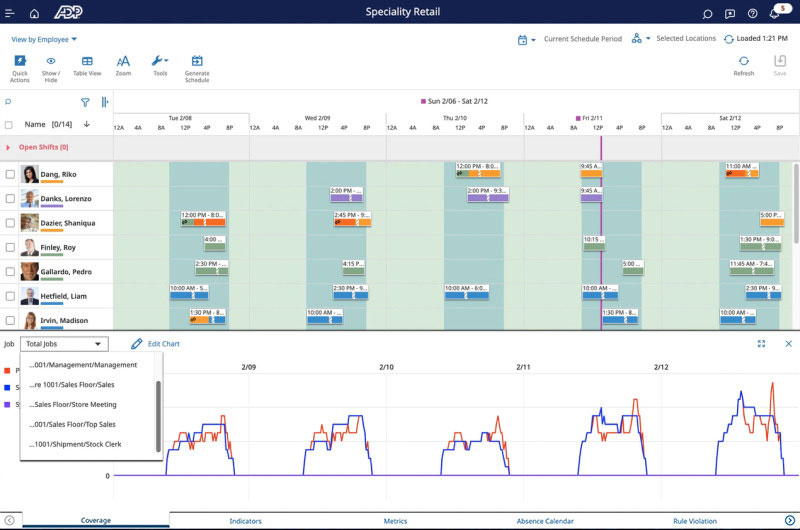
In this example, an employer uses a workforce management solution with demand scheduling. It is capable of:
- Creating schedules that keep labor costs within budget, minimize coverage gaps and maximize productivity.
- Automating forecasting, increasing accuracy down to 15-minute increments to meet employer, business, and budget requirements.
- Analyzing historical trends, seasonality and business drivers to predict future labor needs by the day, shift, location or demand channel.
Best shift planning software features
There are multiple levels of shift planning solutions, ranging from basic online scheduling to more advanced, system-assisted scheduling. Depending on their specific needs and the solution they choose, employers can expect to:
- Easily plan, build, and manage schedules from a smartphone or tablet.
- Improve the decision-making process with the aid of automated recommendations.
- Predict labor needs accurately using precise business and labor forecasting algorithms and actionable data.
- Ensure appropriately skilled employees are scheduled when they are needed most.
- Empower employees and prioritize their preferences with self-scheduling, shift swaps and last-minute changes.
- Access up-to-the-minute scheduling data to help stay on budget.
- Set, monitor, and report on workforce key performance indicators (KPIs), including efficiency, productivity, forecasting accuracy, labor utilization and other custom KPIs.
Scheduling software vs. manual scheduling
Scheduling software delivers greater efficiency, consistency and visibility than manual scheduling, which can be time-consuming, complex and prone to coverage gaps, particularly as workforces grow.
The table below provides a deeper dive into how the two options match up across different capabilities:
| Capability | Manual scheduling | Scheduling software |
|---|---|---|
| Forecasting | Managers must gather and analyze historical data, which can be labor intensive. | Software automates data analysis, scenario modeling and staffing calculations. |
| Labor cost visibility | Spotting overtime trends and potential cost overruns can be difficult with paper-based systems. | Employers can integrate scheduling software with financial systems to effectively track labor costs and budgets. |
| Shift swaps | Swapping shifts requires managerial intervention and could result in coverage gaps if not done quickly. | Self-service tools allow employees to share their preferences and swap shifts up to the last minute. |
| Compliance alerts | Employers are responsible for tracking wage and hour regulations and keeping pace with any updates. | Software may be supported by compliance experts who can help employers comply with the latest requirements. |
| Schedule creation | Creating schedules using spreadsheets may take considerable time. | Employers can quickly copy a schedule from week to week or create standard shifts with defined breaks. |
Frequently asked questions about how to schedule shifts
Why is shift planning important?
Shift planning is essential because understaffing and overstaffing increase labor costs. Mismanaged schedules can also lead to disengaged employees, poor productivity, and higher turnover rates.
What should be included in a shift planner?
At the very least, a shift planner should offer online and mobile scheduling capabilities and some form of employee self-service. More advanced solutions may provide collaborative scheduling, business and labor forecasting, and access to real-time, actionable data.
What is shift-based HR planning?
Shift-based HR planning strives to coordinate the number of employees working at any given time with the expected consumer or business demand. The goal is to prevent understaffing and overstaffing, both of which increase labor costs.
What are five scheduling principles?
- Align schedules to fluctuating business demands to reduce overtime and labor costs.
- Incorporate employee preferences and availability when scheduling shifts to avoid dissatisfaction and burnout.
- Monitor key performance indicators (KPIs), such as efficiency, productivity, labor utilization, etc.
- Address differing labor requirements in each location to improve service and conversion rates.
- Comply with regulations concerning overtime, shift and meal breaks and fair scheduling, as well as predictive scheduling laws where applicable.
What are common work schedules?
There is a shift schedule to fit almost any business or industry need. Examples include:
- Fixed schedule – Employees work the same hours from one week to the next.
- Split schedule – Employees work two non-consecutive shifts on the same day.
- Rotating schedule – Employees work different shifts from week to week.
- Flex schedule – Employees make their own hours within certain limits.
- Compressed schedule – Employees put in an entire week’s worth of work in fewer days.
- On-call schedule – Employees work during off-business hours only when needed.
What is scheduling software?
Scheduling software is a digital solution that helps employers create and manage schedules more efficiently and accurately than manual methods, like spreadsheets. It can be used to assign shifts, approve or deny time-off requests, track employee availability and adjust coverage on the fly. Ultimately, scheduling software is designed to help ensure there is adequate staff to sustain business operations.
How far in advance should employee schedules be posted?
Employers generally post employee schedules as far in advance as practical to help reduce scheduling conflicts and improve employee satisfaction. The time frame is a business decision in most cases, but some states and cities have enacted fair workweek laws that require employers to comply with specific advanced notice periods.
What causes overstaffing?
Overstaffing is most commonly caused by inaccurate demand forecasting. In other words, the employer schedules more employees than needed to accommodate the customer traffic, workload or sales volume. This practice is costly because the business pays employees for minimal productivity.
This article is intended to be used as a starting point in analyzing how to make work schedules and is not a comprehensive resource of requirements. It offers practical information concerning the subject matter and is provided with the understanding that ADP is not rendering legal or tax advice or other professional services.
1This article is not meant to encompass predictive scheduling law requirements or compliance with the same.
2Note that predictive scheduling laws, if applicable, may impact creation of schedules, when and how they are provided to employees and other factors.